Import & sync external data
Bring objects from an external system (e.g. dbt, Snowflake, Power BI) into your model as externally-managed objects, and keep them in sync as the source changes.
Importing
-
Open Model Actions ▸ External ▸ Import External Data.
-
Paste an itb-shaped payload, or load it from a
.jsonfile.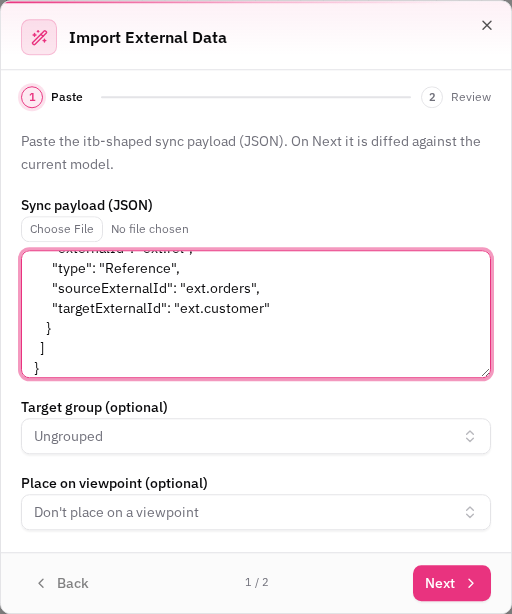
-
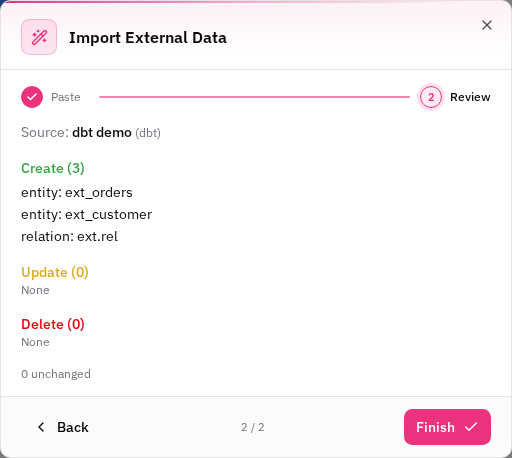
Review the preview: objects to create, update, delete, and any collisions (see below). Critical changes — like deleting an object a user-drawn relation depends on — are flagged with a warning.
-
Optionally choose a target group and viewpoint to place the imported objects on.
-
Finish to apply everything as a single, undoable step.
Managed objects are read-only
Imported objects carry a "Managed by …" badge (naming the external source) and are read-only in the UI — their fields, attributes, and custom-property values are owned by the source. You can still add your own attributes and custom properties alongside them; those stay editable.
Re-syncing
Re-running the import reconciles the model with the latest payload: changed objects update, objects no longer in the payload are removed (with integrity checks so a shared endpoint entity is never deleted out from under a relation), and an empty payload removes the whole source.
Collisions & adoption
If the source delivers an object that matches one you already added by hand (same name on the same parent, or same endpoints+type for a relation), the preview lists it under Collisions. By default the local object is adopted — it's stamped as managed and the source owns it going forward — so you never end up with silent duplicates. Per collision you can instead keep both or skip the incoming one.