Pack Configuration
A pack's configuration is what decides which artifacts your model produces. Not code — a declaration. This page walks through it using the two retail demo packs, because they model the same business world and produce entirely different things from it.
Install Demo: Retail Data Vault and generate: you get dbt models for a Data Vault. Install Demo: Retail Business Objects and generate: you get a JSON Schema per object and an HTML data catalog. Same customers, same products, same orders. The difference is configuration all the way down.
This page explains the levers. If you would rather pull them and watch what happens, the walkthrough does exactly that, one change at a time.
What a pack declares
Two blocks, and everything below is one or the other. Requirements are the vocabulary the pack needs in your model; definitions are the rules that turn model into files.
{
  "requirements": {
    "entity_types": [
      { "name": "Business Object", "key": "ebo_object",       "match_by": "key" },
      { "name": "Value Object",    "key": "ebo_value_object", "match_by": "key" }
    ],
    "attribute_types": [
      { "name": "Identifier",           "key": "ebo_identifier",  "match_by": "key" },
      { "name": "Required Property",    "key": "ebo_required",    "match_by": "key" },
      { "name": "Descriptive Property", "key": "ebo_descriptive", "match_by": "key" }
    ]
  },
  "definitions": [
    {
      "name": "ebo_object_schema",
      "type_key": "ebo_object",
      "template": "object.schema.json.jinja2",
      "context_builder": "build_ebo_object_schema_context",
      "name_pattern": "{name}.schema.json"
    },
    {
      "name": "ebo_catalog",
      "type_key": "model",
      "scope": "model",
      "template": "catalog.html.jinja2",
      "context_builder": "build_ebo_catalog_context",
      "name_pattern": "catalog.html"
    }
  ]
}
That is the whole business-object pack's configuration, trimmed of descriptions. Two types, three attribute types, two definitions — and out of it come four JSON Schemas and a data catalog.
The four levers
1 · The entity type decides whether a file is produced
A definition names a type_key and applies to entities of that type. There is a definition
for ebo_object and none for ebo_value_object — so a Value Object matches nothing
and produces nothing. It has no identity of its own, exists only inside the object that
contains it, and appears only embedded there.
"Should this be a file?" is answered by which type you gave the entity, and by nothing else. You can check it per entity without generating anything — see Show Templates.
match_by: "key" matters. The definition matches ebo_object, not the display name
"Business Object", so renaming the type in Settings → Types does not break it.
2 · The attribute type gives a column its role
The data type of an attribute says what it is: text, number, date. The attribute type says what it is for, and that is what the templates read.
The business-object pack declares three:
| Attribute type | In the generated schema |
|---|---|
| Identifier | required and readOnly — the business key |
| Required Property | required |
| Descriptive Property | optional |
Here is the pack turning that into schema properties. This is the code that reads your model, and the whole of it is about the attribute's type:
for attr in self._attrs(entity_id):
    role = self.imh.type_key(attr.id) if attr.type else None
    if role not in (ROLE_IDENTIFIER, ROLE_REQUIRED, ROLE_DESCRIPTIVE):
        continue                      # no type: skipped, not guessed at
    json_type, json_format = JSON_TYPES.get(attr.datatype or "string", ("string", None))
    out.append(PropertyContext(
        name=attr.name,
        json_type=json_type,          # from the DATA type: date -> string/date
        role=role,
        required=role in (ROLE_IDENTIFIER, ROLE_REQUIRED),
        read_only=role == ROLE_IDENTIFIER,
    ))
Two questions, answered in two places: attr.datatype says what the column is,
type_key(attr.id) says what it is for.
An attribute you give no type to is skipped rather than guessed at. In an API contract, a field whose obligation nobody decided is worse than a missing field.
An attribute also carries a mandatory flag, and using it would have been easier. The pack
reads the attribute type instead — partly because that is the point it is making, and
partly because a flag cannot tell "required field" from "business key", and that difference
is readOnly in the schema.
The Data Vault pack answers the same question with different types — Hash Key, Business Key, Link Foreign Key, Hashdiff, Payload — because in that world a column's role is a different question with different answers.
3 · The relation type decides the shape
Relations are not only lines on the canvas; a pack reads them.
In the business-object pack, Contains embeds the target inside the object, and References points at it through its identifier. The same two objects, connected by a different relation type, produce a different schema.
In the Data Vault pack the relations carry the data flow — which seed feeds which staging view, which staging view feeds which hub — and the staging view's hash columns are computed from the objects it feeds. Model one more hub, and that staging view changes without anyone editing a template.
4 · Custom properties carry everything else
Some things are statements about an object rather than fields of it: who owns it, how it is classified, which system is the source of truth. Those belong in custom properties, and a pack can declare the ones it wants.
The business-object pack declares six — business domain, owner, data steward, classification, status, system of record — and its catalog page renders them as a table. They appear in no JSON Schema, because they are not part of the contract.
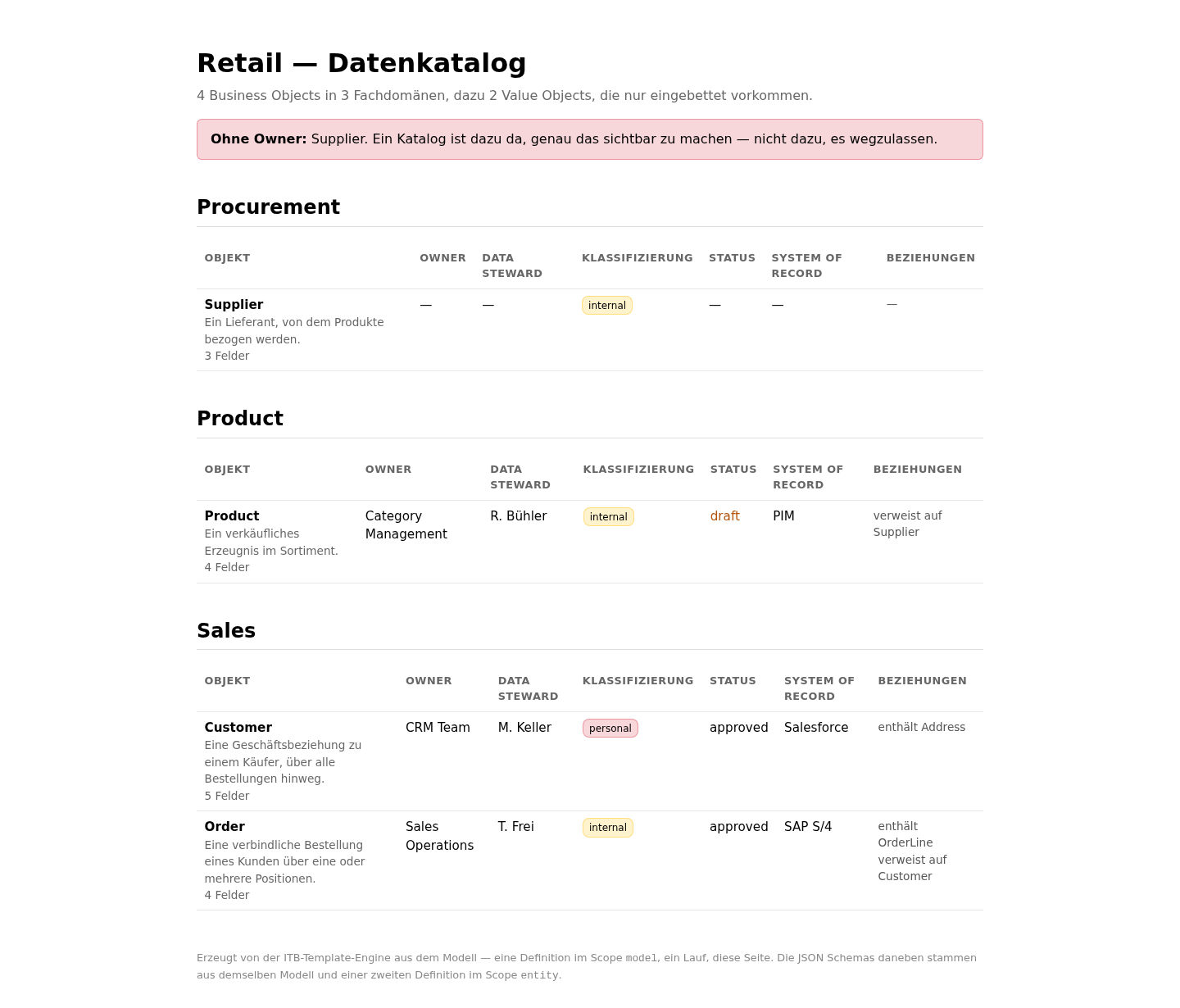
An object with no owner is listed in that catalog and named at the top of it. A catalog exists to make that visible, not to hide it.
The template
A definition points at a template, and the template turns the context into a file. The schema template starts like this:
{
  "$schema": "https://json-schema.org/draft/2020-12/schema",
  "title": {@ ctx.title | tojson @},
  "type": "object",
  "properties": {
{=- for p in ctx.properties =}
    {@ p.name | tojson @}: {
      "type": {@ p.json_type | tojson @}{= if p.read_only =},
      "readOnly": true{= endif =}
    }{= if not loop.last =},{= endif =}
{=- endfor =}
  }
}
Two things about the syntax, and both have cost people time:
The delimiters are {@ … @} and {= … =}, not the usual double braces. That is
deliberate: it leaves {{ … }} untouched, so a template can write dbt or Jinja code into
the generated file without the engine eating it. The Data Vault pack relies on exactly
that.
Every value goes through | tojson. Assembling JSON by hand breaks on the first
description containing a quote — and it breaks at the reader, not during generation, which
would report success either way.
One model, two kinds of output
A definition also declares its scope — how often it runs:
| Scope | Runs | Produces |
|---|---|---|
entity | once per matching entity | one file per object |
model | once, for the whole model | one file over everything |
The business-object pack uses both. Its schema definition is entity-scoped, so four business objects give four schema files. Its catalog definition is model-scoped, so the whole model gives exactly one HTML page.
Both definitions apply at the same time, to the same model, in the same run. Every definition whose conditions match generates — they do not compete, and they do not know about each other.
What generation looks like
Run Generate All over the combined demo bundle, which carries both worlds and both packs, and you get twelve files from one model:
- seven dbt models — three staging views, two hubs, one link, one satellite;
- four JSON Schemas, one per business object;
- one HTML catalog page.
Each pack quietly ignores the entities belonging to the other. "No template found for this type" is the correct answer, not a failure.
Seeing which rule fired
You do not have to read a pack to find out what it will do with a given entity. Right-click the object's title bar on the canvas and choose Show templates: the Templates tab lists every definition that matched, the artifact it would produce, the pack it came from — and per row, Explain why reports the matching rule and View code shows the file, without generating anything.
Doing it once on Customer and once on Address in the demo is the shortest possible version of this page. Full detail: Show Templates.
Reading the demo packs
Both demo packs are open — their configuration is readable JSON, and reading it is the fastest way to see how the pieces above fit together. Each ships a README describing what it generates, what it deliberately does not, and which of its claims a test covers.
The next step from here is Custom Wizards: the same idea applied to the application's own interface, where a wizard is a declaration too.