0.1.2 (API)
ITB API 0.1.2 accepts Git remotes in the form your host gives you, SSH addresses included.
Part of ITB 0.1.2 release - See master release
🏗️ Infrastructure
Open documentation with licence badges, and the use case as a dimension
StandardThe documentation site no longer withholds material by licence level — it publishes it and marks it. Every changelog entry carries a badge saying which licence the change needs (Standard or Enterprise), and the release overview groups its counts by licence so the split is visible before you read a single entry.
A pack declares how it is delivered
StandardA capability pack now states in its own configuration whether it is delivered encrypted or in the open. The field is distribution, it takes exactly two values — encrypted and open — and it is mandatory for a capability pack: there is no default value, and a pack without the field stops the scripts that read it rather than being guessed at in either direction.
One marketplace item installs several components
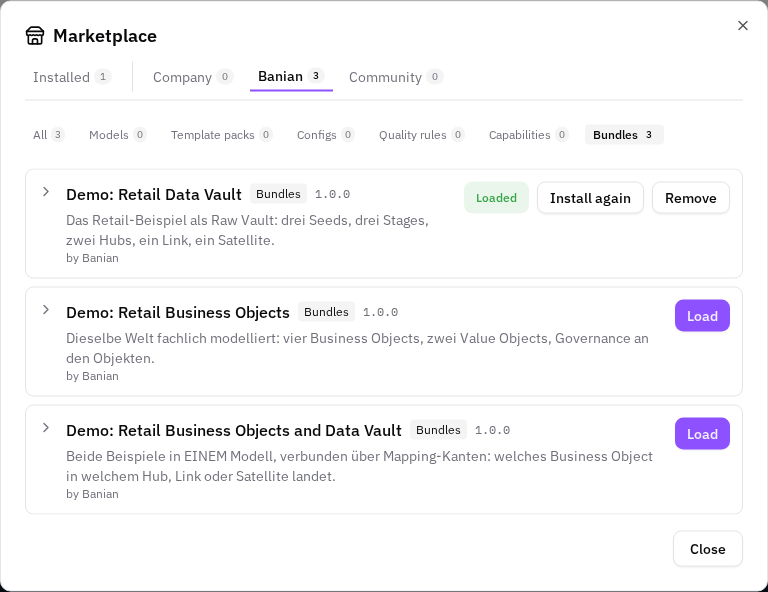
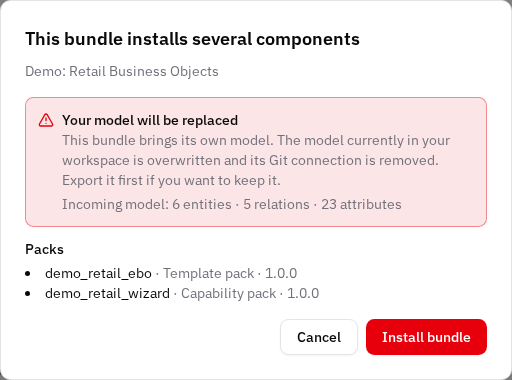
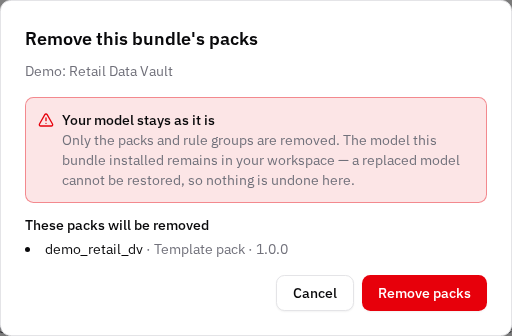
StandardThe marketplace has a sixth group, Bundles. A bundle is one item that installs several components at once — a model with its type configuration, template packs, capability packs and quality rule groups — in the order that makes them work.

🐞 Fixes
Git remotes that are not HTTPS URLs work again
StandardPush and pull accept the remote address in the form your Git host gives you. An SSH address — git@github.com:your-org/your-repo.git, the one behind GitHub's Clone with SSH button — is now handed to Git unchanged.
Das Benutzerhandbuch wird im öffentlichen Image wieder angezeigt
StandardWer ITB nach der Anleitung aus dem öffentlichen Repository startet und im Hilfe-Menü auf Documentation klickt, bekam eine leere Seite mit der Meldung „Your Docusaurus site did not load properly." Die Seite selbst kam an — nur keine ihrer Dateien.